
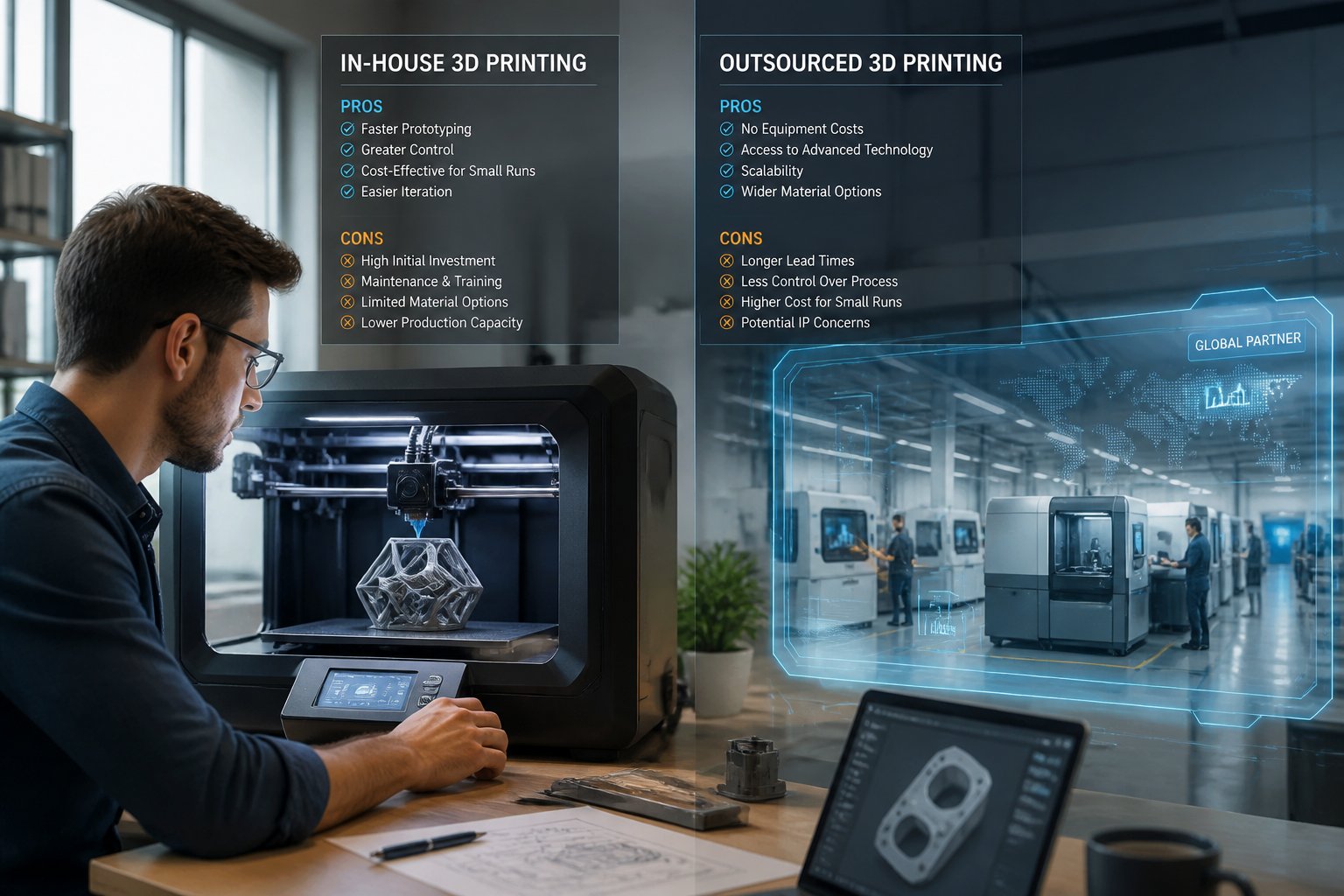
In-house vs outsourced 3D printing is a decision that can shape how fast you move, how much you spend, and how much control you keep over your parts and prototypes. It's not a one-size-fits-all answer — the right choice depends on your volume, budget, and how often your designs change. In-house printing gives you speed, control, and privacy. Outsourcing gives you access to industrial-grade equipment and materials without the upfront investment. In this guide, we break down the pros, cons, and key factors to consider — so you can make the right call for your business.
- In-house printing gives you fast iteration and full control, but you'll need to invest in equipment and skills
- Outsourcing delivers pro-level quality and scale without the hassle of maintenance or a steep learning curve
- Your choice really comes down to print frequency, budget, material needs, and whether you care more about speed or expertise
Ready to stock your in-house setup? Browse our 3D printing resin collection — engineered for clean, detailed prints across a wide range of applications.
Understanding In-House 3D Printing

In-house 3D printing means you own the equipment and run it right in your space. You get direct control over production, but you'll also need to cover the upfront costs and deal with ongoing maintenance.
Advantages of In-House 3D Printing
Cost savings kick in if you print a lot. Once you've paid for the printer, each part is way cheaper than outsourcing. Desktop 3D printers can crank out parts for about a tenth of what you'd pay outside.
Speed is a real perk. You can print new parts in just a few hours, no waiting for a vendor to get around to your order. That means faster testing and a quicker path to market.
Design control stays with you. Make changes whenever you want — no extra requests, no extra fees. Plus, your designs never leave your building, so your intellectual property stays safe.
Flexibility is huge. Print what you want, when you want — even if it's just a single part or a tiny tweak. If you've got a few desktop printers, you can run different jobs at the same time.
Drawbacks of In-House 3D Printing
Initial investment isn't small. Even desktop printers can cost a few thousand bucks. Industrial models can run $250,000 to $1 million, and you'll need a lot of space and special ventilation.
Maintenance costs sneak up on you. Repairs, replacement parts, regular tune-ups — it all adds up. Industrial printers, in particular, need a lot of attention.
Staff training can be a pain. Your team has to learn the machines, fix issues, and dial in the settings. Building real expertise takes time, and honestly, a fair bit of patience.
Material limitations are real, especially with desktop machines. If you want high-performance materials or big parts, you'll need industrial equipment. Desktop printers are best for smaller stuff and basic prototypes.
| Factor | Pros | Cons |
|---|---|---|
| Cost | Low per-part cost at volume | High upfront investment |
| Speed | Print on demand, any time | Limited by machine capacity |
| Control | Full design and quality control | Requires trained staff |
| IP Security | Files never leave your building | Internal security still required |
| Materials | Consistent, repeatable results | Limited to what your printer supports |
| Maintenance | You control the schedule | Ongoing costs and downtime risk |
Exploring Outsourced 3D Printing
Outsourcing 3D printing means you send your files to a service bureau. They handle everything — printing, finishing, shipping. You get access to fancy machines and expert operators, but you give up some control and might pay more per part if you print a lot.
Advantages of Outsourced 3D Printing
No upfront equipment costs — that's a big relief if you're new to 3D printing. You just pay for what you need and skip the expense of buying and maintaining printers.
Access to multiple technologies is a big deal. Service bureaus have all sorts of machines and materials — stuff you probably wouldn't buy yourself. Need FDM for a quick prototype? SLS for something functional? Even metal? They've got it covered.
Professional finishing services are usually included. Parts show up already cleaned up — supports removed, surfaces smoothed, painted, whatever you want. Saves you a lot of hassle and learning.
Scalability is easy. If you suddenly need a hundred parts, just ask. No need to buy extra printers or worry about capacity. This is great for those random big orders or seasonal spikes.
Drawbacks of Outsourced 3D Printing
Higher per-part costs start to sting if you print often. You're paying for their labor, overhead, and profit. If you're running lots of jobs, it usually gets more expensive than just buying your own printer.
Longer lead times can slow you down. You wait for your turn in their queue, then for printing, finishing, and shipping. If you need parts fast, rush fees can make it pricey.
Less control over quality can be frustrating. You're stuck with their settings and standards. If something's off, you can't just reprint it right away.
Intellectual property concerns pop up when you send out your files. Sure, most bureaus will sign NDAs, but your designs are out of your hands during production and shipping.
| Factor | Pros | Cons |
|---|---|---|
| Cost | No upfront investment | Higher per-part pricing |
| Speed | Scale up instantly for big orders | Lead times and shipping delays |
| Technology | Access to industrial machines | No direct control over settings |
| IP Security | NDAs available | Files leave your hands |
| Materials | Wide range of options | Less consistency between orders |
| Finishing | Professional post-processing included | Extra cost for premium finishes |
Important Factors for 3D Printing Decisions

Choosing between in-house and outsourced 3D printing isn't just about cost. You've got to think about your production needs, materials, timelines, and how much you care about keeping your designs secret. These factors will steer your decision.
Cost and Budget Considerations
Total cost of ownership isn't just the sticker price on the printer. You've got materials, maintenance, software, and training to consider. The more you print, the cheaper each part gets, so in-house starts to make sense if you're running jobs regularly.
Outsourcing is pay-as-you-go. You pay per part, and that covers labor, materials, and overhead. If you only print occasionally, this is usually cheaper. But watch out for premium rates on rush jobs — they can add up fast.
Want to know when you'll break even? Divide your total investment by the difference in per-part price. Say you print 50 parts a month at $20 each outsourced or $5 each in-house, and you spent $30,000 on equipment — you'll break even in about 20 months. Volume is everything here.
Production Volume and Speed
Your print volume really drives your choice. If you're just prototyping now and then, outsourcing is easier. If you're pumping out parts all the time, owning a printer pays off.
Turnaround time is another biggie. With in-house, you start prints whenever you want — overnight, weekends, whenever inspiration hits. That's a huge advantage for rapid design changes.
Outsourcing adds lag — emails, shipping, waiting in line. Service bureaus can ramp up with big batches using multiple machines, so for a huge one-off order, they might even beat your single in-house printer. But for day-to-day speed, in-house usually wins.
Material Quality and Options
Your material needs can tip the scales. Service bureaus offer a buffet of technologies — SLS, FDM, resin, and more — with all kinds of materials, from basic plastics to high-end engineering stuff.
In-house, you're limited to what your printers can handle. Some machines let you use third-party materials, but most have a set menu. The upside? You control quality and consistency when you print yourself.
Outsourcing makes it easy to test materials without buying a whole spool or tub. Once you know what works, in-house might save you money. If you need special finishes or post-processing, some service bureaus are hard to beat.
Confidentiality and Intellectual Property
Worried about design security? In-house printing keeps everything in your building. You decide who sees your files and finished parts — less risk of leaks or theft.
With outsourcing, you have to share your files. Most bureaus will sign NDAs, but you're still exposing your IP to more hands. If you're in defense, medical, or any industry with tight security, in-house is usually safer.
How much risk can you tolerate? If it's just a basic bracket, maybe you don't care. If it's your next big innovation, you'll want to keep it close. Some companies mix it up — keep the sensitive stuff in-house, outsource the rest. It's all about your comfort level and the stakes involved.
Building out your filament inventory? Shop our 3D printing filament collection — reliable spools for prototypes, functional parts, and everything in between.
Choosing the Best Solution for Your Business
Let your production needs call the shots. If you're doing one-off jobs or the occasional prototype, outsourcing is probably your best bet. No big upfront costs or maintenance headaches.
If you're cranking out prototypes or scale models every week, buying a printer pays off after a couple of years. You'll save per part and speed up your workflow.
Ask yourself:
- How many parts do you need each month?
- Do you need to tweak designs and iterate quickly?
- Is IP protection a deal-breaker?
- What's your budget for equipment versus per-part costs?
If you're prototyping all the time, in-house is a game-changer. You can print parts in hours — not wait around for shipping. That kind of speed helps you test and improve designs fast.
Your team's skills matter too. In-house printing means you need folks who can run the machines and fix issues. If you'd rather skip the training, outsource and let the experts handle it.
Budget-wise, here's a rough guide:
| Timeline | Best Option |
|---|---|
| Under 1 year | Outsourcing |
| 1–2 years | Either option |
| Over 2 years | In-house |
If you're just dipping your toes in, start with outsourcing. You can always buy a printer later if your needs grow. Desktop printers are a nice middle ground for experimenting without breaking the bank.
Conclusion: In-House vs Outsourced 3D Printing
In-house and outsourced 3D printing both have a place depending on where your business is right now. If you print regularly and need fast turnarounds, bringing it in-house pays off quickly. If you're just getting started or printing low volumes, outsourcing keeps costs down without the commitment.
The right choice comes down to your volume, budget, and how much control you need over your parts and timeline.
Ready to take your setup further? Check out our guide on how to price 3D prints and make sure your numbers work from day one.
Frequently Asked Questions: In-House vs Outsourced 3D Printing
Lots of businesses run into the same questions when figuring out 3D printing. The big ones? How do the options really differ, should you get a printer for home, and what's the deal with the terminology and costs?
What is the difference between in-house printing and outsourcing?
In-house printing means you own and operate the printers yourself — you buy the gear, train your team, and control every step of the process. Outsourcing means sending your designs to a service bureau that handles printing, finishing, and shipping on a per-job basis. It comes down to control versus convenience — in-house gives you speed and direct access, while outsourcing skips the upfront costs but adds lead time and higher per-part pricing.
Should you have a 3D printer in your house?
It depends on how much you print and what you're making — if you're doing five or more parts a month, a desktop printer usually pays for itself. Desktop printers are under $10,000, fit in a regular office, and can turn around finished parts in hours. If you print occasionally or need unusual materials, outsourcing is easier with no learning curve or maintenance.
What is the difference between inhouse and outsourcing?
"Inhouse" and "in-house" mean the same thing — keeping production inside your company instead of hiring someone else. With in-house production, your team controls the process, timeline, and intellectual property from start to finish. Outsourcing shifts all of that to an outside company — you send designs and get back finished parts without managing the process yourself.
Is outsourcing cheaper than in-house?
Outsourcing costs less upfront since you skip buying equipment, but service bureaus charge anywhere from $50 to several thousand dollars per part depending on complexity. A decent desktop printer runs $3,000–$10,000 to buy, and per-part costs drop to a fraction of outsourcing rates once the machine is paid off. Most businesses hit the break-even point around five parts a month — beyond that, in-house printing usually makes more financial sense.